
Best audio cleaner for Mac · 100% On-Device · One-Time Purchase
AI audio cleaner for Mac: remove noise, fillers & more.
Native Mac AI audio cleaner: remove background noise from video and audio, cut filler words & stutters, trim silences, add live reverb, echo & warmth.
Auto-generate transcripts in 99 languages.
100% on-device. Your files never leave your Mac.
No subscription.
macOS 14+
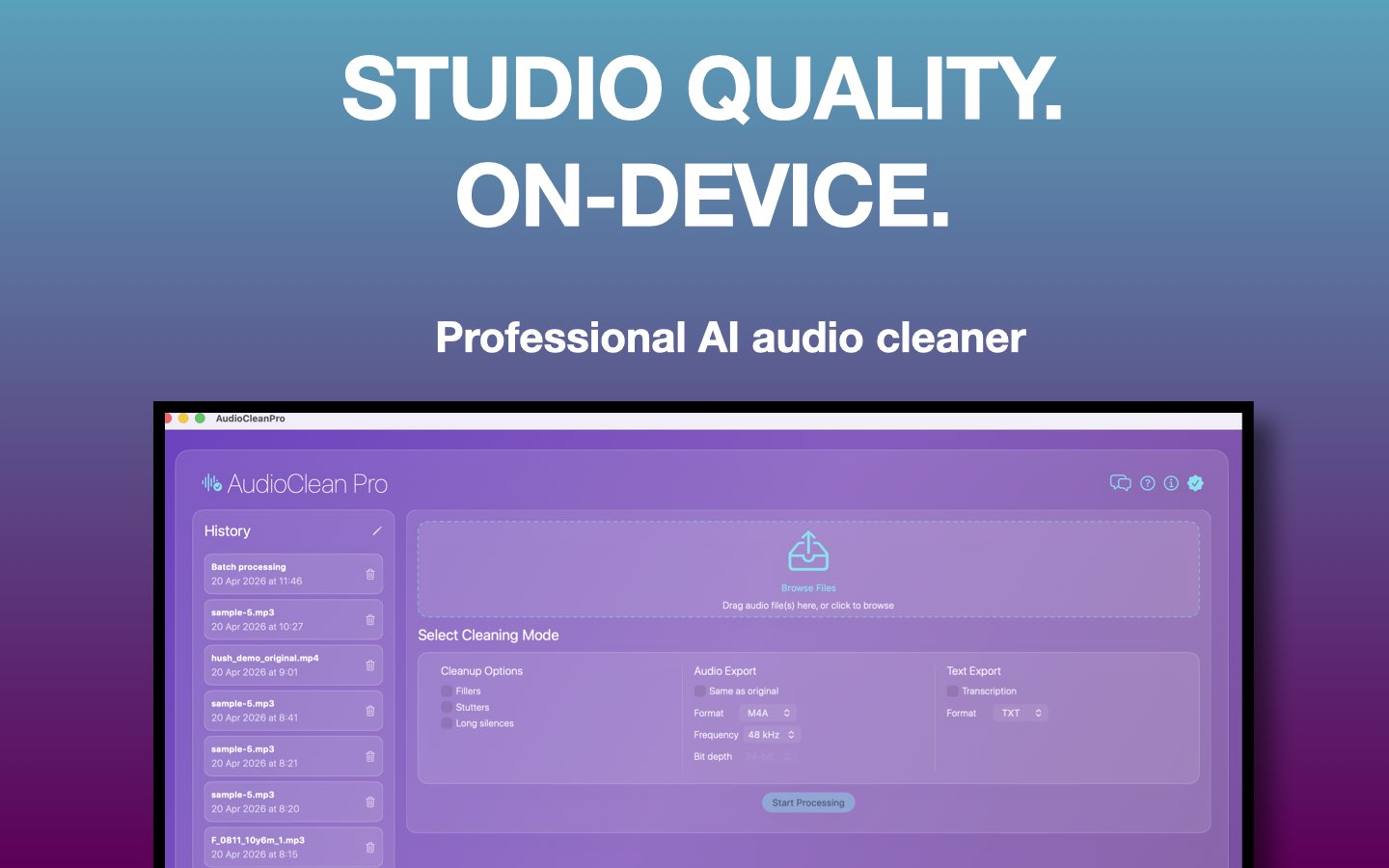
- 100% on-device, files never uploaded
- Remove background noise from video & audio
- Filler words, stutters & long silences
- Live reverb · echo · warmth preview
- Transcription
- Batch processing · History
- MP3 · WAV · FLAC · M4A
Noisy background removed
Removed street noise

#1 AI Audio Clean Mac App for Creators, Engineers & Professionals
AudioClean Pro vs Hush and every other tool
Hush ($99) only removes background noise. AudioClean Pro does that and everything else, one-time purchase, no subscription, no uploads.
| Feature | AudioClean Pro | Hush | Cleanvoice / Adobe | Auphonic |
|---|---|---|---|---|
| Noise removal | ✓ | ✓ | ✓ | ✓ |
| Filler word removal (um, uh…) | ✓ | ✗ | ✓ | ✗ |
| Stutter removal | ✓ | ✗ | ✓ | ✗ |
| Long silence trimming | ✓ | ✗ | ✓ | ✓ |
| Live reverb / echo / warmth preview | ✓ | ✗ | ✗ | ✗ |
| Transcription | ✓ | ✗ | Partial | ✗ |
| Batch processing | ✓ | ✗ | ✓ | ✓ |
| Job history | ✓ | ✗ | ✗ | ✗ |
| 100% on-device (no uploads) | ✓ | ✗ | ✗ | ✗ |
| Price | $59 Lifetime one purchase $89 | $99 one-time | $9–$15/mo | $11/mo |
| Best for: | Podcasters, creators & voice pros who want everything in one native Mac app |
Simple noise-only removal | Cloud-based editing workflows | Cloud audio post-production |
vs Hush
- Filler word removal (um, uh)
- Stutter removal
- 100% on-device, no uploads
- Live reverb / echo / warmth preview
- $40 cheaper ($59 vs $99)
vs Cleanvoice / Adobe Podcast
- 100% on-device, nothing leaves your Mac
- Live reverb / echo / warmth preview
- One-time price, no monthly fee
- Job history saved locally
vs Auphonic
- Filler word removal + stutter removal
- 100% on-device, no uploads
- One-time price, no monthly fee
- Live reverb / echo / warmth preview
Total Cut Control
We highlight the filler words; you make the final call. Edit and approve your transcript draft before we remove anything from your audio.
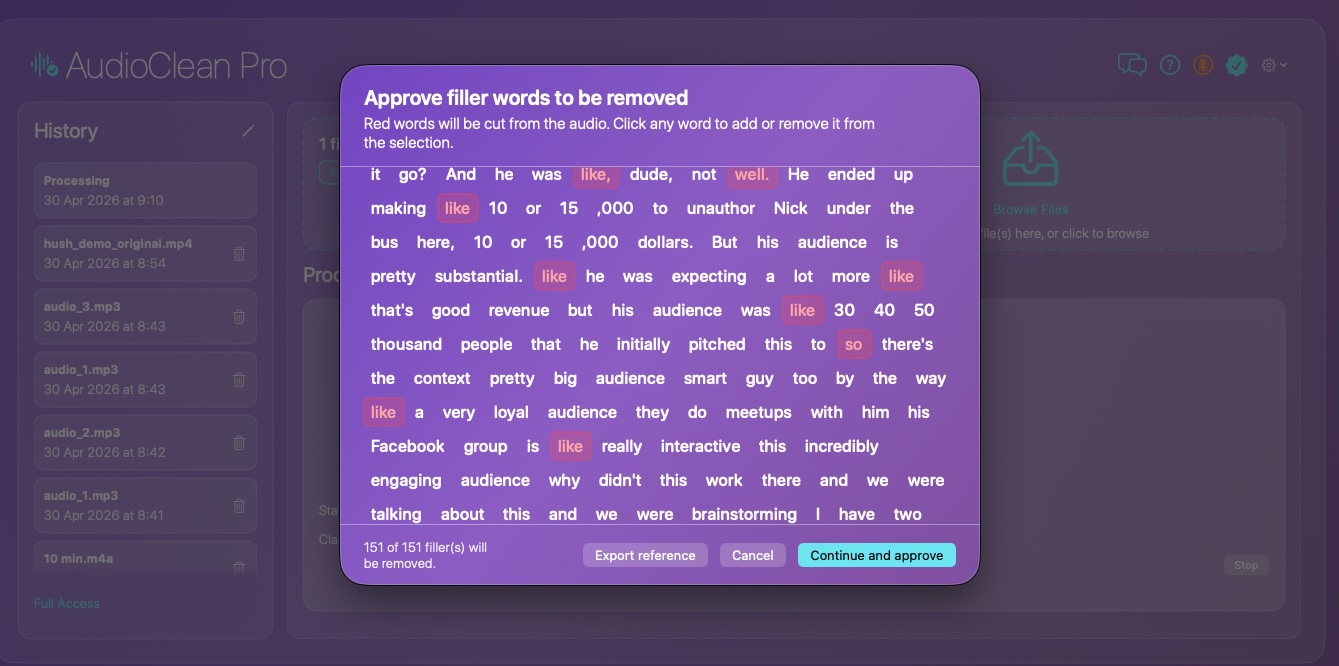
Speech cleanup
- Fillers: Remove "um", "uh", "like", "you know" automatically
- Stutters: Detect and remove repeated syllables and word stutters
- Long silences: Trim dead air and long pauses to tighten pacing
Noise reduction
- Broadband noise: remove ventilation, appliances, traffic, wind, hum, and hiss
- Transient sounds: eliminate chirping birds, barking dogs, and honking horns with surgical AI precision
- Room reflections: reduce echoey reverb and comb filtering from untreated rooms to large spaces
- Live adjustable: tune strength in real time before processing
- Sound style profiles: Voice Clarity, Warm, Neutral, Broadcast, Off
- Apple Silicon Neural Engine: blazing fast, energy-efficient; no fan spin, no CPU throttle
Live preview effects
- Reverb: adds space and depth; adjustable wet/dry mix
- Echo: 200 ms delay repeat; adjustable mix
- Warmth: subtle tape saturation for a richer, fuller voice
- Loudness target: Broadcast (−23 LUFS), Podcast (−16), Streaming (−14), Studio (−12)
- All settings lock in when you press Start Processing
Export options
- Audio formats: M4A, WAV, AIFF, FLAC, MP3
- Sample rates: 44.1 kHz, 48 kHz, 96 kHz, 192 kHz · Bit depths: 16, 24, 32-bit
- Match source, export in the same format and properties as the input file
- Video support: process audio from MP4, MOV directly, no extraction needed
- Text export: transcript as TXT, PDF, or DOC
Transcription
- Generate accurate text transcripts from speech. 99 languages supported
- English, Spanish, French, German, Japanese, Chinese, Arabic, Hindi, and more
A/B preview, batch & history
- A/B preview: side-by-side waveform comparison of original vs cleaned
- Batch processing: drop multiple files, process all with shared settings
- Job history: revisit and re-export any previous processing result
Easy as 1-2-3
Open your file
Drag in audio or video; pick a preset that matches your content.
Preview cleanup
Hear original vs cleaned, adjust intensity, then refine.
Export
Save MP3, WAV, FLAC, or M4A, and transcripts when you need them.
Simple, honest pricing
Limited time offer, regular price $89 after launch
- Unlimited audio & video files
- All features: noise removal, fillers, stutters, silences
- Live reverb, echo & warmth effects
- Batch processing & job history
- Transcription
- All future updates included
- 100% on-device, files never leave your Mac
Free 14-day trial · then one-time purchase via Mac App Store
Your files never leave your Mac
AudioClean Pro processes everything 100% on-device. All AI models, including noise reduction, speech detection, and transcription, run locally on your Mac. No audio is uploaded to any server. Your recordings and transcripts stay exclusively on your device. See our Privacy Policy.
What our users say
"Recording a weekly podcast from my home office means fighting my AC, street noise and a neighbor who mows his lawn at the worst possible times. Spent months trying to fix it, Audacity noise gates, Descript also, even paid plugins: nothing felt right, something always got mangled. AudioClean Pro cleaned up my worst recordings in seconds and my voice still sounds like me. Listeners started DMing me asking if I upgraded my mic. I didn't. Just switched to AudioClean Pro."
CleanAudio Pro saved my 2-hour interview with a guest who had a buzzing fan in the background. It literally sounds like we were in a professional booth now!
The batch processing is a game-changer for my workflow. I can clean an entire season's worth of audio clips in the time it takes to grab a coffee.
I record in a noisy apartment, but this app makes my voice pop over the game audio. My audience finally stopped complaining about my mic quality!
Our training modules used to sound hollow and echoey. This app added a 'Studio Sound' depth that makes our internal comms feel premium.
The AI-driven de-noiser is surprisingly transparent. It cleans up vocal takes without eating into the high-end frequencies I need for the mix.
Interviewing sources in loud cafes used to be a transcription nightmare. This app isolates the voice so clearly that I never miss a quote.
Frequently asked questions
What is audio clean?
Audio clean means improving spoken recordings by reducing noise, hum, mouth clicks, filler words, and uneven levels so podcasts and voiceovers sound clearer. AudioClean Pro is a Mac app focused on that workflow with AI-assisted cleanup and LIVE preview before export.
What is an audio clean app?
An audio clean app is software that cleans recordings, often with AI, without a full manual workflow in a traditional DAW. AudioClean Pro is an audio clean app for Mac that removes fillers, background noise, stutters, and long silences with presets and A/B preview.
What is audio clean AI?
Audio clean AI uses machine learning to separate speech from noise, detect fillers and hesitations, and apply cleanup that fits your voice. AudioClean Pro uses audio clean AI on macOS for noise reduction, filler removal, studio-style polish, and optional transcription.
What is an audio clean tool?
An audio clean tool is any app or utility that helps you clean audio files: denoise, level, trim silence, or remove unwanted speech habits. AudioClean Pro is an all-in-one audio clean tool for Mac with loudness matching, waveform preview, and export to MP3, WAV, FLAC, or M4A.
How do I get audio clean for Mac?
Install a native audio clean app for Mac from the Mac App Store. AudioClean Pro runs on macOS 14 or later, uses audio clean AI for noise and fillers, and includes A/B preview and export to MP3, WAV, FLAC, or M4A.
Can I use audio clean AI on a Mac?
Yes. macOS apps such as AudioClean Pro run audio clean AI in a desktop workflow: noise reduction, filler removal, optional transcription, and preview before export.
Is AudioClean Pro free for Mac?
AudioClean Pro includes a free 14-day trial with full access. After that, a one-time $59 one time purchase - launch price lifetime purchase unlocks the app forever. No subscription, no monthly fees, no credits to track. Regular price is $89 after the launch period.
Does AudioClean Pro work on Mac only?
AudioClean Pro currently works on Mac (macOS 14.0 and above). An iOS version may come later.
What audio formats does the Mac app support?
AudioClean Pro exports M4A, WAV, AIFF, FLAC, and MP3, at sample rates from 44.1 kHz to 192 kHz and bit depths of 16, 24, or 32-bit. It also processes video formats (MP4, MOV) directly.
Can AudioClean Pro remove background noise from podcasts?
Yes, AI noise removal works with most common noise types in podcasts and interviews.
How does filler word removal work?
AI detects fillers like "um" and "uh" and removes them while preserving the rest of your speech.
Does AudioClean Pro have transcription features?
Yes, AudioClean Pro generates a full text transcript from your audio. Export as TXT, PDF, or DOC.
Is my audio data kept private?
Yes, completely. AudioClean Pro processes everything 100% on your Mac. Your audio and transcripts never leave your device. No server, no uploads, no cloud processing.
How is AudioClean Pro different from Audacity or Audition?
One-click AI cleaning and a preview-first workflow optimized for podcasters and creators without requiring deep DAW skills.
Is AudioClean Pro a Hush alternative?
Yes, and it does far more. Hush only removes background noise without control on loudness or option to add any other audio procesing. AudioClean Pro adds filler word removal, stutter removal, transient noise removal, long silence trimming, optionally add reverb/echo/warmth effects with real-time preview, transcription, batch processing, and full on-device privacy, all for a one-time purchase.
Is AudioClean Pro an Adobe Podcast alternative?
Yes. AudioClean Pro handles everything Adobe Podcast Enhance does, including noise removal, voice clarity, and loudness normalization, plus filler word cutting, transcription, and live effects preview. Everything runs 100% on your Mac; no Creative Cloud subscription needed.
Is AudioClean Pro better than Adobe Enhance?
For podcast and voiceover workflows on Mac, AudioClean Pro goes further: removes filler words, stutters, and long silences, adds live reverb/echo/warmth effects, and runs entirely on-device. Your audio never touches a server.
Is AudioClean Pro an Auphonic alternative?
Yes. Unlike Auphonic's subscription-based cloud workflow, AudioClean Pro processes everything 100% on your Mac. Nothing is uploaded. It also adds filler word removal, stutter removal, live effects preview, and transcription that Auphonic doesn't offer.
Is AudioClean Pro a Cleanvoice alternative?
Yes. AudioClean Pro offers the same filler word and noise removal but runs natively and entirely on-device on Mac, includes transcription and live reverb/echo/warmth preview, with a one-time purchase instead of a monthly subscription.
Can AudioClean Pro remove background noise from video on Mac?
Yes. AudioClean Pro can remove background noise from video files (MP4, MOV) directly on Mac. Drop in your video, let the AI audio enhancer clean the audio track, then export the cleaned audio or keep it as a video. No round-trip to a separate tool needed.
Does AudioClean Pro support transcription?
Yes. AudioClean Pro transcribes your audio and exports the transcript as TXT, PDF, or DOC, directly from the same workflow as your audio cleanup.
AI audio cleanup, 100% on-device, engineered for macOS
14-day free trial · one-time purchase · no subscription
Download on the Mac App Store